
WiFi vs wired network for office — which is better for your serviced office? It is one of the most common questions we receive from clients across Malaysia and the Asia-Pacific region. The answer depends on your business operations, user count, security requirements, and growth plans. Here is what 200+ office deployments have taught us.
Servcom Solutions has designed and deployed IT infrastructure across Malaysia, Singapore, Indonesia, Philippines, Thailand, and Japan — giving us practical insight that goes beyond textbook recommendations.
The Rise of WiFi-Only Offices
Wireless technology has advanced considerably. With WiFi 6 and WiFi 6E access points, many businesses comfortably support laptops, smartphones, tablets, wireless printers, video conferencing, and cloud applications including Microsoft Teams, Zoom, and Google Workspace.
For small offices with fewer than 10 employees, a well-designed WiFi-only setup can be sufficient — provided the access points are enterprise-grade and properly placed. Our WiFi Services team can assess your space and recommend the right access point layout.
Consumer-grade routers from retail stores are not designed for multi-user business environments. An enterprise WiFi access point handles concurrent connections, VLAN segmentation, and roaming in ways a home router simply cannot. According to the Wi-Fi Alliance, Wi-Fi CERTIFIED products undergo rigorous testing to ensure interoperability, security, and reliability — standards that consumer devices do not meet.
WiFi vs Wired Network for Office: Why Cables Still Matter
Despite wireless improvements, Ethernet cables continue to deliver advantages that matter in a business environment. Our Network Management team sees these differences firsthand across every office deployment we handle.
| Advantage | Wired (Ethernet) | WiFi |
|---|---|---|
| Stability | Unaffected by interference, walls, or nearby networks | Can degrade with interference or congestion |
| Speed consistency | Gigabit performance all day, regardless of user load | Shared bandwidth; peaks at higher user counts |
| Latency | 1–5ms typical — ideal for VoIP, VPN, video calls | 5–30ms+ depending on environment |
| Security | Physical port control; harder to intercept | Secure with WPA3 enterprise but wireless by nature |
| Scalability | Add switch ports as needed; predictable performance | Each AP has a practical device limit |
Which Devices Should Be Wired vs WiFi?
WIRED Always connect via Ethernet
- Servers and NAS storage
- Business firewalls
- Network switches
- CCTV recorders and cameras
- Meeting room computers and displays
- Reception and front-desk PCs
- High-volume office printers
- IP phones (VoIP)
- Video conferencing systems
- Access control systems
WiFi Perfectly suited for wireless
- Employee laptops
- Smartphones and tablets
- Hot desks and flexible workstations
- Guest internet access
- Temporary workstations
- Wireless printers (light duty)
- Wireless presentation devices
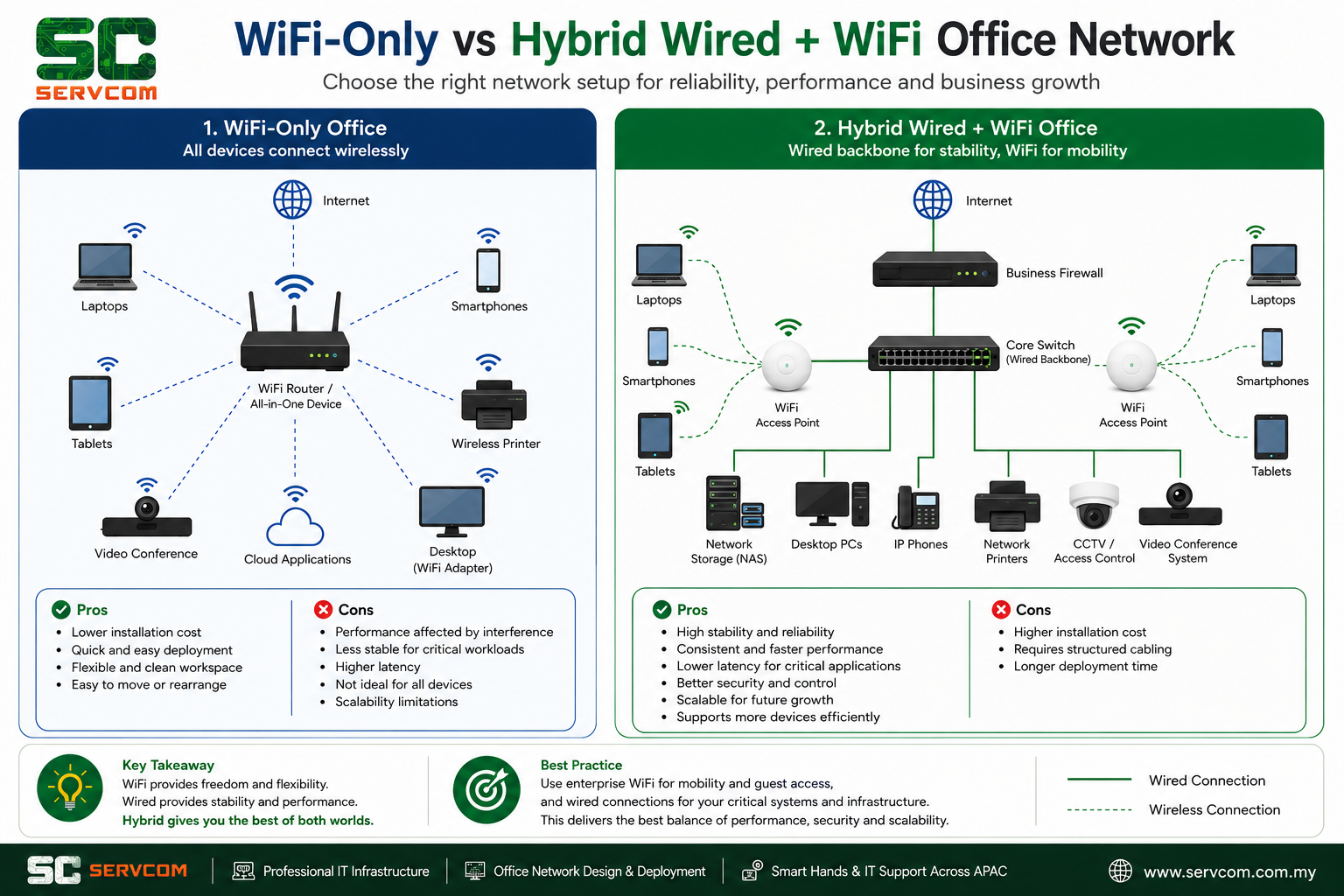
Our Recommendation: The Hybrid WiFi vs Wired Network Approach
For most serviced offices, the right answer is not choosing between WiFi or cables — it is combining both. A hybrid network gives you the flexibility of wireless mobility alongside the reliability of a wired backbone.
A typical hybrid office network includes:
- Enterprise-grade WiFi access points for laptops, phones, and guest access
- A wired Ethernet backbone connecting all switches, APs, and critical devices
- A business-grade firewall with proper security policy enforcement
- Separate Guest WiFi VLAN and Corporate WiFi VLAN
- Ethernet drops for all fixed-location business-critical equipment
Separating guest traffic from corporate traffic is not optional — it is a basic security requirement. A single shared network means a guest device can potentially reach internal systems. Enterprise WiFi controllers and managed switches make this straightforward to configure and enforce.
Common Network Mistakes We See in Offices
Many offices experience slow or unstable networks because of design and equipment choices made at setup. The most common issues our IT support team encounters when called in to diagnose network problems:
- Using consumer-grade routers instead of enterprise access points
- Overloading a single AP with too many concurrent users
- No WiFi heatmap or coverage planning before installation
- No network segmentation between guest and staff devices
- Running servers, CCTV, and VoIP phones entirely over WiFi
- Improper switch and firewall configuration leading to broadcast storms or security gaps
These issues tend to surface gradually, becoming more noticeable as headcount grows or video conferencing becomes routine.
✅ Office Network Health Checklist
Use this to quickly evaluate your current office network setup.
- ☐ Are you using enterprise-grade WiFi access points (not consumer routers)?
- ☐ Is your WiFi coverage planned with a site survey or heatmap?
- ☐ Are your servers, firewalls, and switches connected via Ethernet — not WiFi?
- ☐ Do you have separate VLANs for Guest WiFi and Corporate devices?
- ☐ Is a business-grade firewall managing all inbound and outbound traffic?
- ☐ Are your CCTV, IP phones, and meeting room equipment on wired connections?
- ☐ Can your current infrastructure scale if you add 10–20 more users?
- ☐ Has your network been reviewed by an IT professional in the past 12 months?
If you answered No to three or more questions, your office network may benefit from a professional review.
How to Choose the Right WiFi vs Wired Network Solution
Before deciding on a network design, consider:
- How many employees will use the network simultaneously?
- Do you hold frequent video calls or large online meetings?
- Will you install CCTV, IP phones, or access control systems?
- Do you require secure VPN access for remote staff?
- Is your business likely to grow or move within the next two to three years?
The answers to these questions determine whether a simple WiFi deployment is sufficient or whether a structured cabling and hybrid approach is the right investment from day one.
Frequently Asked Questions: WiFi vs Wired Network for Office
How Servcom Can Help With Your Office Network
Servcom Solutions provides professional office network design and deployment throughout Malaysia and across the Asia-Pacific region. With over 200 office projects completed, our IT support team has hands-on experience across serviced offices, co-working spaces, corporate headquarters, and multi-site rollouts for MNCs including IWG/Regus locations in Malaysia, Singapore, Indonesia, the Philippines, Thailand, and Japan.
Our services include:
- Office IT infrastructure design and deployment
- Enterprise WiFi site survey, heatmap planning, and installation
- Structured network cabling (Cat5e, Cat6, Cat6A)
- Rack and stack — patch panels, switches, and cable management
- Firewall supply, installation, and configuration
- Network switch configuration and VLAN setup
- Smart Hands and Remote Hands services across APAC
- Multi-site office rollout support and IT project management
Need a Professional Network Assessment?
Whether you are opening a new serviced office or upgrading an existing one, Servcom can design a reliable hybrid network that supports your team today and scales with your business. We respond within 1 business day.